
TL;DR
Moving your AI rig into a closet or cabinet can dramatically cut noise—if you handle placement, ventilation, and soundproofing right. Proper airflow and strategic treatment make a noisy machine whisper-quiet, without sacrificing performance.
Ever cranked up your AI rig and wished it could disappear into the wall? The common instinct is to toss foam panels on the walls or slap a blanket over the case. But the real game-changer isn’t just dampening sound — it’s about where you put the machine and how you manage heat and airflow. When you put a loud, heat-generating rig in a closet, you’re not just hiding noise; you’re risking overheating and throttling. If you want to learn more about cooling options, check out this guide on reducing heat and noise in your AI setup.
This article isn’t about buying more foam or fancy soundproof boxes. It’s about practical, proven techniques to make your workspace silent and cool, even if your machine roars like a jet. Whether you want a dedicated closet setup or just need to silence a noisy corner, I’ll walk you through the essentials—placement, ventilation, and the truth about acoustic treatment.
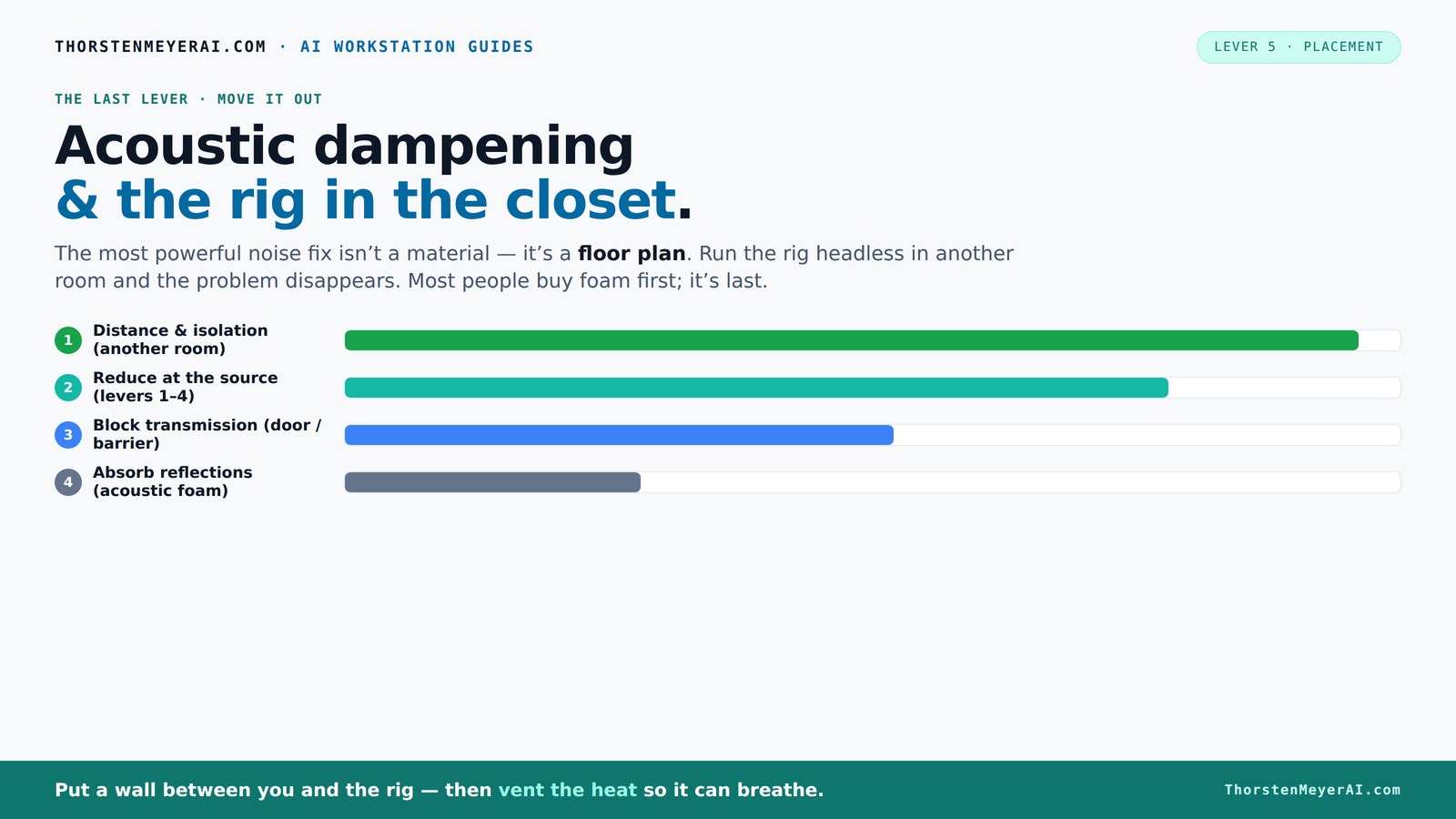
Acoustic dampening
& the rig in the closet.
The most powerful noise fix isn’t a material — it’s a floor plan. A rig you can’t hear because it’s in another room beats any amount of foam. Tap the approaches in Part 1 to see what actually works.
(another room)
(levers 1–4)
(door / barrier)
(acoustic foam)
Contain the noise, not the heat
Key Takeaways
- Moving your rig into another room or closet is the most effective noise reduction method—distance and barriers beat foam every time.
- Ventilation is critical: sealed spaces trap heat, risking damage and throttling; use active exhaust fans and ducting for safety and performance.
- Understand the difference between acoustic dampening (inside a room) and soundproofing (blocking sound transmission). Combining both yields best results.
- Placement inside the closet—away from doors, vibration-isolated, and with good airflow—makes your setup quieter and cooler.
- Partial acoustic treatment, like first reflection point panels and bass traps, improves sound quality without overdoing it in small spaces.
Why Moving It Is the Most Powerful Way to Silence Noise
When your AI rig lives in another room or closet, the noise just doesn’t reach you. That’s because distance is a sound’s best enemy. A GPU in another room can be blasting at full throttle, but if it’s 20 feet away behind a thick wall, you’ll barely hear it. The physics are simple: sound diminishes with distance, especially when blocked by barriers.
Take my friend Sarah. She moved her AI workstation into a closet in her basement. Now, she types away, blissfully unaware of the fans screaming behind her. The noise reduction was instant. All she needed was a wired connection and some ventilation. No amount of foam could match this effect.
This approach works for any setup. With AI workstations, you usually connect over a network—so why sit next to a noisy machine? The key is to keep the rig in a place where noise doesn’t matter, then control the airflow and heat dissipation.
The 'Rig in the Closet' Setup — How to Do It Right
Placing a high-power machine inside a closet sounds simple—until you realize heat is the enemy. A sealed space traps hot air, causing the rig’s temperature to skyrocket. That’s when fans kick in, noise levels spike, and your setup becomes counterproductive.
To make a closet rig work, you need proper ventilation: reducing heat and noise in your AI setup.
- Passive vents for airflow
- Active exhaust fans to pull hot air out
- Temperature-controlled fans or ducted cooling systems
- Sealing gaps around doors with weatherstripping or acoustic sealant
For example, a DIY enthusiast built a soundproof cabinet with a 600W GPU. He added a small exhaust fan controlled by a thermostat. The result? Silence and stable temps. If you want to learn more about cooling options, check out this guide on reducing heat and noise in your AI setup.
Airflow vs. Soundproofing: Why Both Matter (But Not Equally)
Acoustic dampening and soundproofing are often mixed up, but they serve different purposes. Acoustic dampening absorbs echoes and softens reflections inside a room—like foam panels on walls. Soundproofing, on the other hand, blocks sound from escaping or entering a space—like a thick door or drywall.
For a closet rig, if your goal is to keep noise contained, you need a soundproof barrier—heavy drywall, mass-loaded vinyl, or sealing gaps. But if you want your voice or microphone sound better, acoustic treatment inside the space helps. You can’t just rely on foam to stop noise from leaking out; you need a solid barrier.
In practice, combining both is best. Use barriers to contain noise and internal damping to improve sound quality. For example, a closet with drywall, weatherstripping, plus some foam panels inside makes a surprisingly effective setup.
Placement Strategies That Make Your Closet Rig Quieter and Cooler
Where you put your components inside the closet matters almost as much as the closet itself. The goal is to minimize noise transmission and prevent heat buildup.
Start with these placement tips:
- Keep the GPU away from the door. Place it deep inside the closet, not right next to the door gap where sound leaks out.
- Use vibration isolation. Rubber feet or anti-vibration pads under the case cut down on structure-borne hum.
- Position intake and exhaust fans thoughtfully. Intake should pull cooler air from outside, exhaust should push hot air out of vents or ducts.
- Keep cables tidy and away from fans. Loose cables can vibrate or block airflow, increasing noise and heat.
For example, a streamer I follow installed a small ducted exhaust system in his closet. The GPU’s hot air escapes directly outside, keeping temps below 70°C even during heavy AI workloads. The result? Quiet and cool.
How to Prevent Your Closet Rig From Overheating
Overheating is the biggest risk when sealing a rig inside a closet. Without proper airflow, temps can rise dangerously, causing throttling and even hardware damage.
Here’s how to stay cool:
- Use active ventilation: exhaust fans with thermostats control hot air removal.
- Install ducting or vents to direct hot air outside.
- Choose cooling solutions designed for high heat: liquid cooling or high-CFM fans help dissipate heat faster.
- Monitor temps regularly: tools like HWMonitor or MSI Afterburner alert you when temps spike.
One user set up a small ducted fan pulling air through a vent in his closet door. His GPU stays under 70°C even with 600W of load. Read more about cooling your inference rig at liquid vs. air cooling for inference rigs.
What You Need to Know About Acoustic Treatment in a Small Space
In small closets, acoustic treatment isn't about soundproofing—it's about controlling echoes, flutter, and bass buildup. The goal: make your microphone sound clear, not boomy or boxy. Learn more about acoustic dampening and placement.
Key points:
- Start with treating the first reflection points—mirror trick on side walls and ceiling.
- Add bass traps in corners to tame low-frequency rumble.
- Use reflection filters or portable panels around the mic for better sound capture.
- Don't overdo it—partial coverage (around 20-40%) often suffices in small spaces.
For example, a YouTuber turned her closet into a vocal booth with a few foam panels and a reflection filter. The sound was much clearer, with less echo. Check out her setup in this detailed article.
The Real Cost of Going Fully Soundproof (And When It’s Worth It)
Sealing a closet to block all noise isn’t cheap or easy. It involves adding mass, damping layers, and sometimes complex ventilation systems. Expect to spend hundreds on drywall, damping compounds, and custom sealing.
Is it worth it? If your goal is total isolation—say, recording vocals while a noisy machine runs nearby—it’s a good investment. But for most AI rigs, partial treatment plus placement is enough.
Remember, a sealed box traps heat unless you add active cooling. For true soundproofing, consider a purpose-built soundproof cabinet that combines insulation, damping, and cooling in one package. See some options at heat and noise reduction techniques.
Frequently Asked Questions
Can I turn my closet into a fully soundproof vocal booth without construction?
Yes, with the right combination of acoustic panels, sealing gaps, and adding mass-loaded vinyl or drywall, you can significantly reduce sound leakage. However, full soundproofing requires careful planning and often more advanced materials, but partial solutions can be effective for smaller setups.Will blankets, moving pads, or foam be enough to silence a noisy rig?
For general noise reduction, foam and blankets help absorb reflections and some sound. But they won’t stop sound from leaking outside if the rig is in a sealed space. Combining acoustic treatment with barriers and proper placement is key for real silence.How do I prevent my rig from overheating in a closet?
Use active ventilation—exhaust fans with thermostats or ducted air cooling—to keep airflow moving. Keep vents unobstructed, and consider liquid cooling if heat remains an issue. Regularly monitor temperatures to avoid throttling or damage.Do bass traps in a closet make a difference?
Absolutely. Bass traps absorb low-frequency rumble that builds up in small, enclosed spaces. They prevent boomy vocals and improve overall sound clarity, especially if you record or monitor in the closet.Conclusion
If silence and cool operation matter, don’t settle for just foam panels. Focus on smart placement, proper ventilation, and strategic treatment. Your closet rig can be both a beast and a whisper—if you give it the right environment.
Imagine a tiny, quiet corner where your machine roars in the background, but all you hear is your own voice. That’s the power of thoughtful placement and airflow—simple, effective, and game-changing.